
AI Search Optimization Tools 2026: Free Checks by Job
Key takeaways
- Pick by job: structure scoring, citation audit, technical crawl, or drafting—not one mega-suite for everything.
- Free browser checks cover most pre-publish gaps; paid monitors come later when citations are already a KPI.
- Run llms.txt and crawler rules before you wonder why AI never sees new pages.
What are AI search optimization tools? They are checkers and writers that score whether a page is structured, crawlable, and quotable enough to appear in AI Overviews, ChatGPT answers, or Perplexity—not classic rank trackers with a new dashboard skin. Run one URL through a content check before you buy another subscription.
| Job | I’d start here | Skip if |
|---|---|---|
| Score a draft or live URL for AI extraction | GEO Content Checker | You only need blue-link rank positions |
| Audit blocks models can quote on one page | AI Citation Checker | You want multi-brand monitoring first |
| Validate schema, sitemap, or GPTBot access | Structured Data Checker, XML Sitemap Checker, AI Crawler Checker | Your CMS plugin already passes every deploy |
| Draft from an outline with brand facts | GEO Content Writer | Legal or medical copy that cannot touch an LLM draft |
| Track citations across engines at scale | Paid visibility suites (Semrush AI layer, Ahrefs brand tracking) | Nobody will edit pages after the report |
Why the tool stack split in two
Classic SEO tools answer where you rank in ten blue links. AI answers often cite a paragraph without sending a click. That shifts the work to on-page checks (will this block get quoted?) and technical checks (can GPTBot or ClaudeBot reach the URL?).
Google’s public guidance on AI features in Search still assumes crawlable HTML, helpful structure, and clear authorship—same foundations as classic SEO, with extraction quality mattering more at answer time. Semrush and Ahrefs have added AI visibility layers, but they sit on top of pages you still have to fix.
Most teams I talk to do not need a fourth dashboard on week one. They need one priority URL scored, one JSON-LD error cleared, one robots.txt line corrected. Scale monitoring when citations become a reported KPI and someone owns page edits from the report.
Step 1: Score content structure on a priority URL
Paste the live URL or draft text into the GEO Content Checker. It flags long walls of text, missing list blocks, and sections that are hard to quote.
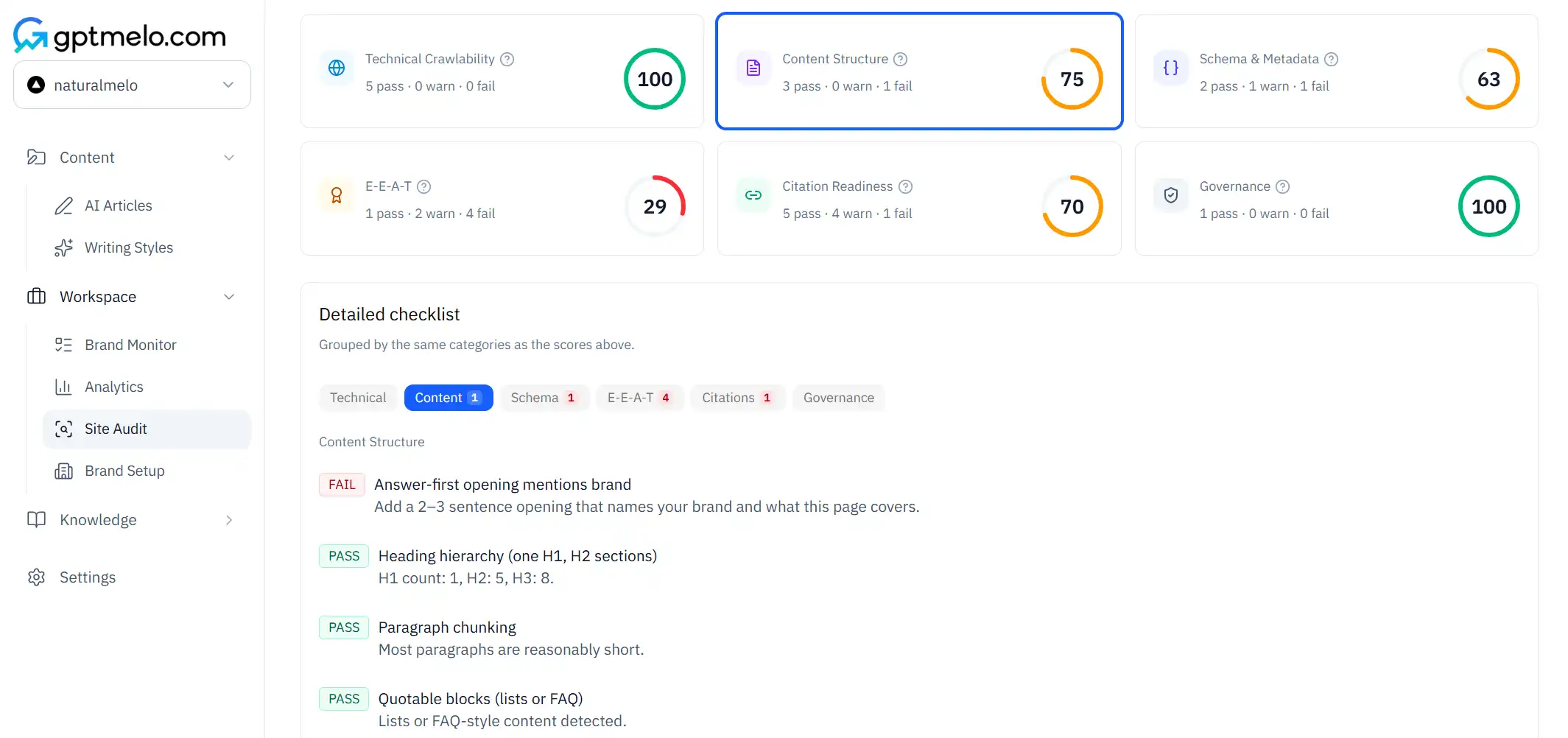
Work the biggest gaps first:
- Rewrite the intro as a direct answer to the query, then add a short list or table.
- Break any paragraph longer than ~120 words into a claim plus bullets.
- Re-run until the intro and first H2 pass—models weight early blocks heavily.
If you maintain a template (product page, comparison, how-to), fix the template once, then roll it out. That beats running the checker on fifty one-off drafts.
Step 2: Stack technical checks before you blame the writing
AI crawlers still read robots.txt, sitemaps, and JSON-LD. Run these after template migrations, CDN changes, or new site sections:
- Structured data — FAQ and Article schema must match visible copy word-for-word on material claims.
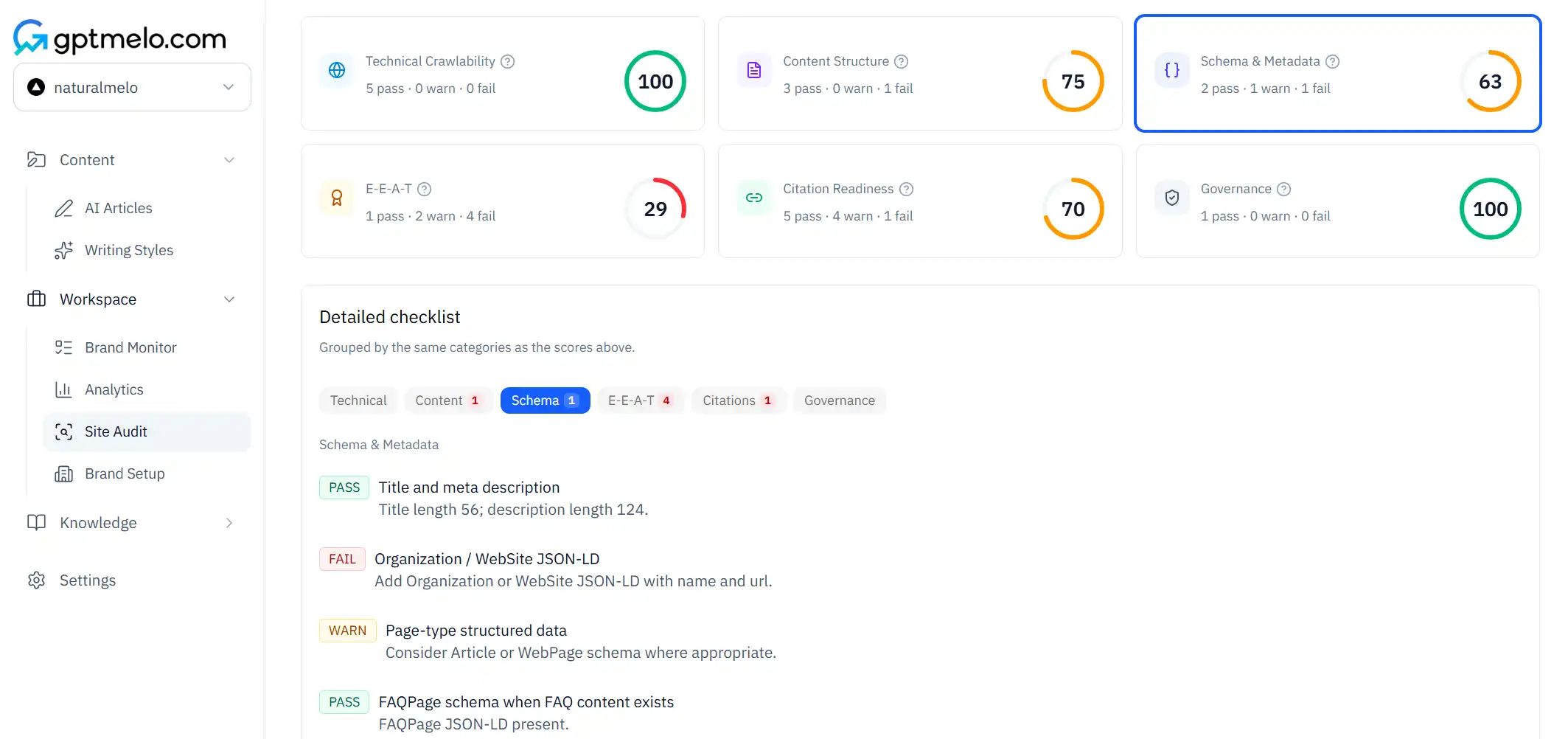
- Sitemap — new URLs appear, return 200, and use consistent canonicals.
- Crawlers — GPTBot and peers are allowed where you intend them to be (OpenAI GPTBot documentation).
- llms.txt — optional curated map; validate format before linking it in site docs.
Each check has a free browser preview on the tools hub. Pair the AI Crawler Checker with the llms.txt Checker when you ship a new llms.txt file.
Step 3: Add citation and trust signals on product and pricing pages
Product, pricing, and comparison pages need complete table cells and attributed stats. Run the AI Citation Checker and EEAT Checker on the template before you clone it across SKUs.
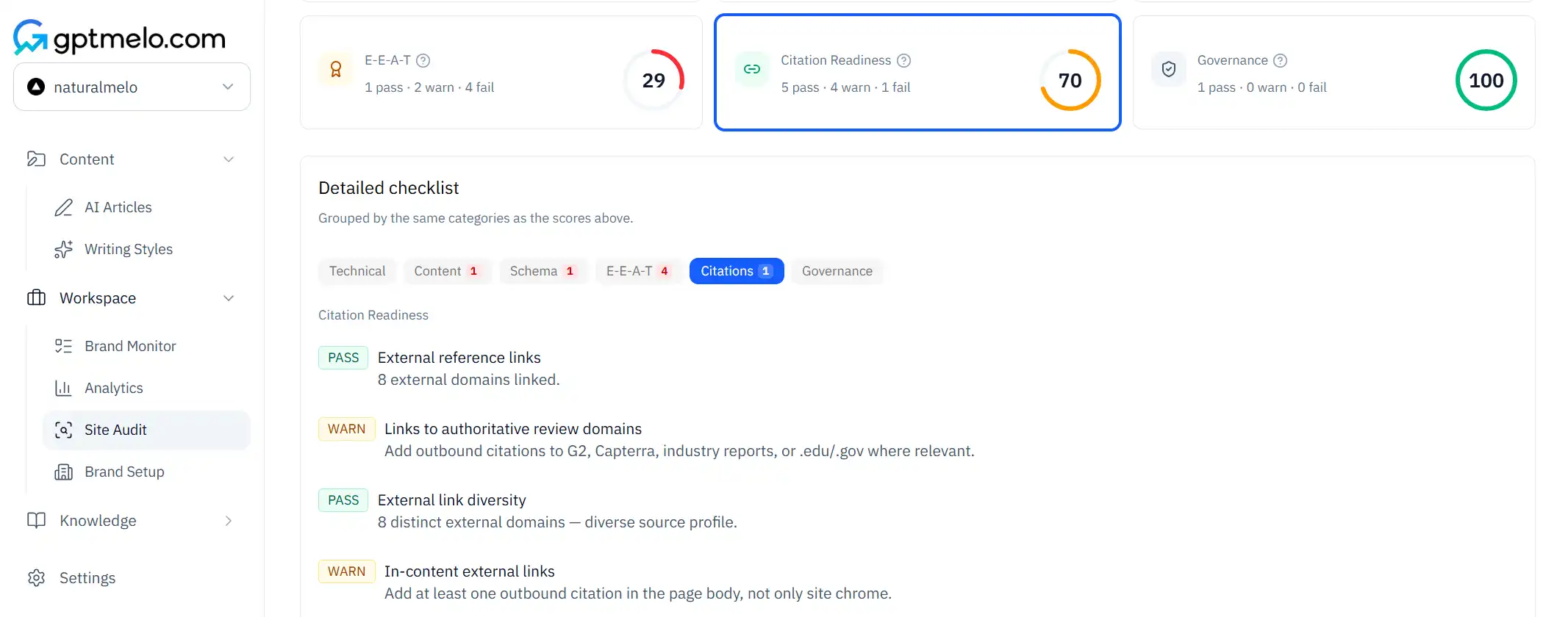
Checklist for each pricing or product page row:
- Author byline and visible update date on the template
- Source line on every number you want repeated in an answer
- FAQ entries rendered in plain HTML, not only inside JavaScript widgets
- Comparison tables with the same columns filled for every vendor
Trust signals are not decoration—they are what models repeat when they summarize your page.
Step 4: Know when free checks end and monitors begin
Free checkers answer “what should I fix on this URL?” Paid monitors answer “are we cited for these prompts across engines this month?” That second question is useless if the first answer is still “your intro is buried in paragraph four.”
| Stage | Tool type | Signal you are ready to upgrade |
|---|---|---|
| Pre-publish | Content + citation + schema checks | Priority templates pass consistently |
| Launch | Sitemap + crawler checks | New sections index and bots allowed |
| Scale | Paid AI visibility / rank hybrids | Citations are a KPI; editors act on reports |
Neutral third-party suites (Semrush, Ahrefs) help when you already use them for organic search. Niche GEO monitors make sense when PR and SEO share a citation spreadsheet. Neither replaces fixing the page.
Tool map: twelve free checks by cluster
The tools hub groups previews into four clusters. Use this when you are assigning work across content, SEO, and engineering.
Content and writing
- GEO Content Checker — structure, intro shape, list gaps on a URL or pasted draft
- GEO Content Writer — outline-first draft with answer-first section rules
- AI Text Checker / AI Text Humanizer — detect or adjust AI-like phrasing when policy requires it
Citation and trust
-
AI Citation Checker — quotable blocks, attribution gaps on one page
-
EEAT Checker — author, trust, and experience signals visible to crawlers
-
AI Search Query Generator — prompt ideas for how people ask about your topic (planning, not monitoring) Technical crawl and discovery
-
AI Crawler Checker — robots rules for GPTBot and related agents
-
XML Sitemap Checker — indexable URLs and response codes
-
Structured Data Checker — JSON-LD validity and FAQ/Article alignment
-
llms.txt Checker / llms.txt Generator — format validation or starter file for curated maps
You do not run all twelve on every URL. Match the cluster to the failure mode: if the page reads well but never appears in AI answers, start technical; if bots can crawl but nothing is quotable, start content.
Workflow for a new site section
When you launch docs, a blog category, or a product line, run this sequence once on the template URL:
- Crawler + sitemap — confirm bots are allowed and URLs are listed.
- Structured data — validate JSON-LD on the template after CMS publish.
- Content check — fix intro and list blocks on the same template.
- Citation check — add sources and complete table cells before bulk publish.
- Re-check after CDN — WAF or CDN changes often rewrite robots without a ticket.
Document the passing template in your CMS style guide so writers inherit structure instead of re-learning checkers per post.
Who runs which check
| Role | First tool | Why |
|---|---|---|
| Content editor | GEO Content Checker | Intro and list shape are editorial fixes |
| SEO lead | Structured Data + Sitemap | Indexation and schema affect all URLs |
| Engineering | AI Crawler Checker | robots.txt and CDN rules live in infra |
| Product marketing | AI Citation Checker on pricing templates | Tables and stats must be complete |
Avoid handing a monitoring dashboard to a team that cannot edit the template the report references—that is how GEO tools become shelfware.
Where paid suites fit
Semrush and Ahrefs remain useful when you already pay for organic search—and both have shipped AI visibility features that track brand mentions in generated answers. Treat them as reporting layers, not substitutes for on-page fixes.
Ahrefs positions brand tracking in AI assistants as an add-on to existing rank workflows. Semrush groups AI visibility alongside content and keyword tools. Neither removes the need to fix intros, tables, and crawl rules on the URLs you care about.
Niche GEO startups focus on citation monitoring across models. Consider them when:
- Leadership asks for month-over-month citation counts
- You have editors who act on URL-level recommendations
- You already fixed templates surfaced by free checks
If those three are false, stay on free checkers until they are true—otherwise you are paying for charts that confirm pages still fail extraction.
Paid AI writing stacks (Jasper, Writesonic, Surfer, Frase) still need the same on-page fixes as free drafts. Before you add another subscription, skim how gptmelo compares on structure for citations—not generic word counts. For category-level vendor grouping, the GEO tools benchmark report is a neutral starting point—not a replacement for running free checks on your template.
Common mistakes
- Buying a visibility monitor before anyone will edit pages from the report.
- Treating organic rank as proof you appear in AI answers.
- Skipping llms.txt and crawler audits after a CDN or WAF change.
- Publishing listicles with empty table cells—models skip incomplete rows.
- Running twelve tools once, filing a PDF, and never updating the template.
- Blocking GPTBot site-wide while wondering why ChatGPT never cites new docs.
Free check: the check that matches the job
Start on the tools hub—twelve free browser checks. Open the row that matched your job table: structure, citations, schema, sitemaps, crawlers, llms.txt, or writing. Do not run every preview once and file a PDF.
For structure patterns (not a tool list), read AI content optimization. For the full framework, use the GEO checklist.
Tool fit notes come from public pages on the tools hub, OpenAI GPTBot documentation, and Semrush/Ahrefs AI feature docs as of August 2026—shortlist by whether the output tells you what to fix on the page.
FAQ
What are AI search optimization tools?
Software that helps pages get cited in AI answers—content checkers, schema validators, llms.txt tools, and citation readiness scorers.
What is the best free AI search optimization tool?
Depends on the job. Use a content checker for structure, a citation checker for quotable blocks, and crawler or sitemap tools for technical readiness. The tools hub bundles twelve free previews.
Do I need a paid GEO monitor to start?
Usually not on day one. Fix structure and crawl access on priority URLs first; add citation tracking when leadership reports on AI visibility.
Related reading
Last updated