Website Content Creation: Home, Help, and About

Key takeaways
- Website content creation is the pages on a site a visitor can use: home, help, about—not a blog calendar.
- Web content creation is the same job. Name who visits, pick the page type, state the point, put it in the menu.
- Draft in GEO Content Writer after you name who the site is for; edit facts before you publish.
Website content creation is making the pages on a site a visitor can use: a home page that states what you do, help that finishes one task, about that says who you are. Web content creation is the same job. It is not a blog calendar, and it is not a slogan with no next step.
| Situation | I’d start here | Skip if |
|---|---|---|
| You need a home page | What the site does in paragraph one | You only needed a blog post |
| You need help or about | The page types below | You only needed a button label |
| You have never published a page | Start with one useful page | You already named who the site is for |
| You mixed an ad with the home page | Split the button from the useful text | You only needed a slogan |
What website content creation is
Website content creation means you decide which pages the site needs, then you write them so a visitor can finish a job. Home tells them what you do. Help finishes a task. About says who you are. Contact and policy pages give facts they can use.
The words on those pages still need a named reader and a point. That definition is in what is content writing. This article is about which site pages to make. It is not a list of writing tips.
If you have never published anything, start with content creation for beginners. Come back here when the site has a menu and a visitor you can name.
Web content creation
Web content creation is pages on a URL a stranger can open. They should be in the menu, or linked from the home page. A Google Doc is not a website page. A carousel with no URL behind it is not a website page.
Do four things for each page:
| Step | Do this |
|---|---|
| 1. Name who visits | One person, one job they came to the site to finish |
| 2. Pick the page type | Home, help, about, or contact—not all four in one URL |
| 3. State the point | Paragraph one says what they will be able to do or know |
| 4. Put it in the menu | Edit facts, then make the page live where they can find it |
Fill who visits and the point before you draft. The form is the content writing brief template.
A first site that works is small. Home, one help page, about. A first site that fails is twenty empty URLs and a slogan.
Home, help, and about
Write one page at a time. Do not paste the home paragraph into help.
| Page | Write this | Skip if |
|---|---|---|
| Home | What you do, who it is for, one next step | A slogan with no next step |
| Help | One task, numbered steps, what to do when a step fails | The whole product on one URL |
| About | Who you are and why the site exists | A resume of every job |
| Contact / policy | Facts they can use (hours, address, what data you keep) | Marketing fluff |
If the home line only exists to get a click, that is copywriting. The difference is in copywriting vs content writing. A home page can hold both: a button that asks for a click, and a short section that explains what happens next. Decide for each part.
If the site is a product with help inside the app, SaaS content writing covers help docs and buyer pages for a named role. Stay here when you are writing the public site: home, about, and help a visitor opens in the browser.
If a page also has to rank for a search, SEO content creation is how you pick the query and fill a brief for that search. A help page can go live without picking a search phrase first. Search ranking is optional.
A blog post is a different page type. How to finish one post is in blog writing tips. Do not use a blog outline as the home page.
AI can draft after you name who visits and what the page does. How to outline before you draft is in ChatGPT for content generation. Do not start with “write website content” and no page type.
What this is not
Skip this list when you needed:
- A blog post outline
- A page made only for search before you know what the site is for
- A first page with no site in mind—that is content creation for beginners
- A hired agency or a content job listing
- An ad whose only aim is a click
Do not treat this as a list of tools. Pick the page. Name who visits. Put it in the menu.
Common mistakes
- Writing a blog calendar before home, help, or about exist
- Putting the whole product on the home page
- Copying about into every URL so no page is for anything
- Writing for everyone who might visit, so the opening names no one
- Asking AI to invent who the site is for
- Calling a slogan website content creation
- Collecting tools instead of publishing one page in the menu
Free check: Home, Help, or About
Open gptmelo’s GEO Content Writer. Draft one Help page — one task, not the whole product on the home URL. No account required.
1. Fill the form. Topic is Help: invite a teammate, numbered steps, and what to do if the invite fails. Brand name and Brand website are the live site that will list this page in the menu. Open More options only if you need them.
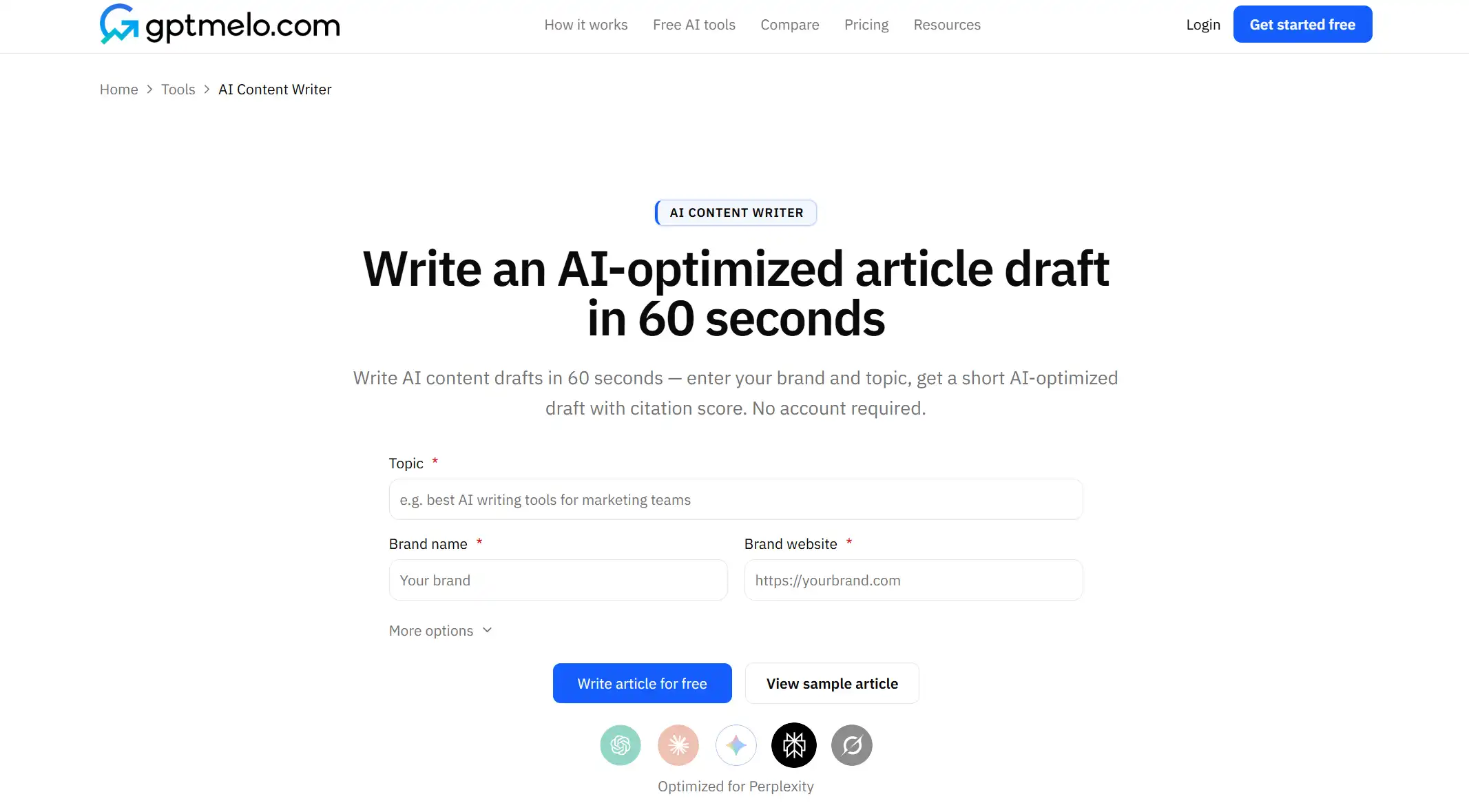
2. Write. Click Write article for free.
3. Read the result. You get a draft next to a GEO content score (Writing, Identity, Cite, Ship). The screenshot is a sample — yours follows Topic. Glance at Ship: could this go in the menu, or is it still a slogan? Use Copy HTML or Copy Markdown. The score is not a fact check.
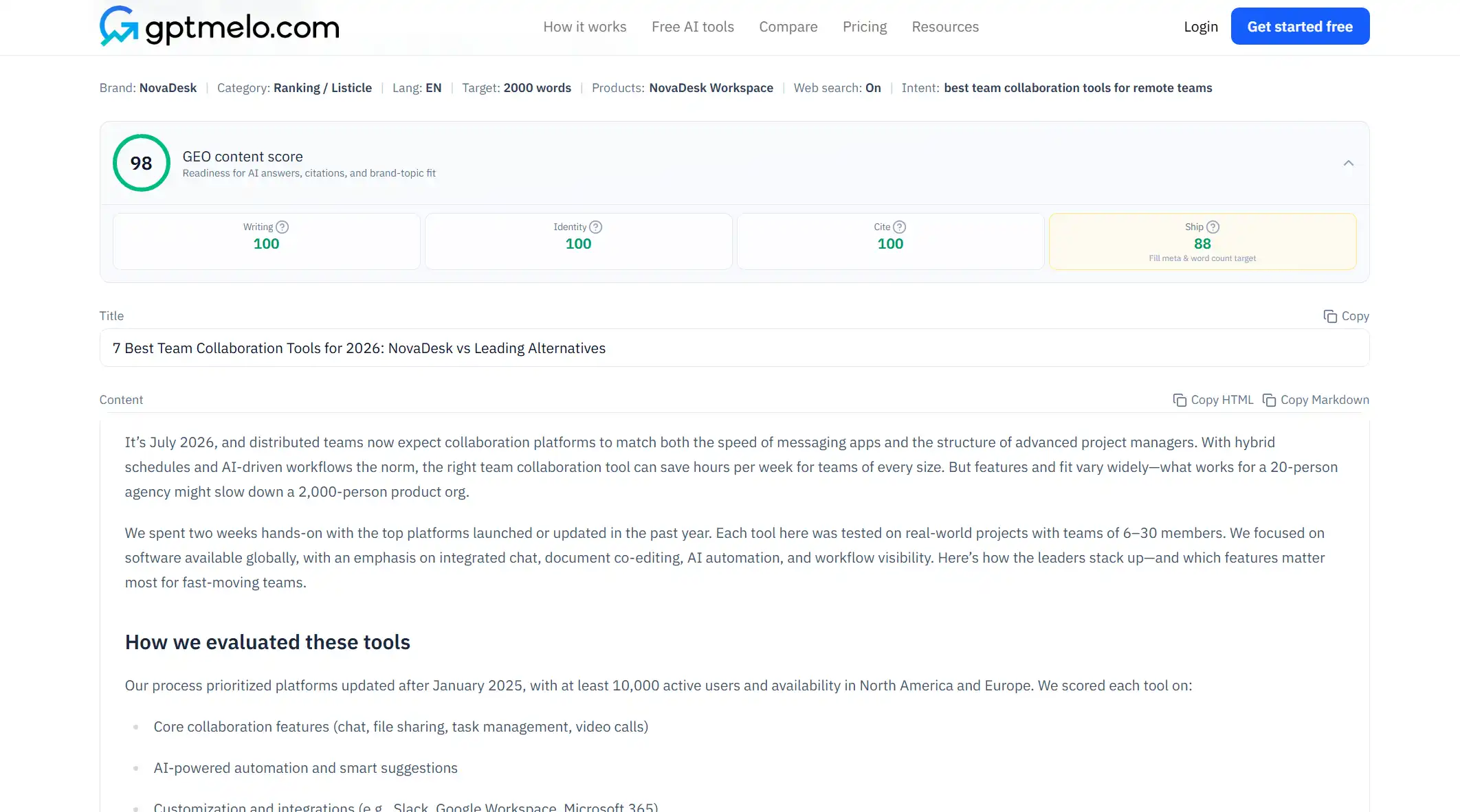
4. Edit, then put it on a URL. Read the draft before anyone else sees it. Do not treat this window as the live page.
The write-check-publish path is in GEO article writing.
FAQ
What is website content creation?
Making the pages on a site a visitor can use: a home page that states what you do, help that finishes one task, about that says who you are. It is not a slogan with no next step.
What is web content creation?
The same job under a shorter name. Pages on the web a stranger can open from the menu—not a social posting calendar and not a stack of unpublished drafts.
Is website content creation the same as blog writing?
No. A blog post is one article. Website content creation is the site pages themselves: home, help, about, contact. You can have both. They are not the same page.
Is website content creation the same as content writing?
Related. Content writing is the words on a useful page. Website content creation is which site pages you make and what each one is for.
Do website pages have to rank in search first?
No. A help page and an about page have to be findable in the menu. Search is extra. If a page also has to rank, pick one query after you know what the page is for.
Should the home page and the help page use the same draft?
No. Home states what you do and who it is for. Help finishes one task. Mixing them gives you a slogan that never finishes the steps, or a tutorial that never says what the site is.