Content Creation Workflow: This Week, Then the Next URL

Key takeaways
- A content creation workflow is the same steps every week: brief, draft, edit, publish, then the next page.
- The content creation process is those steps in order. A content creation plan is this week's one page, not a year of titles.
- Draft in GEO Content Writer after the brief is filled; edit facts before you publish.
A content creation workflow is the same steps every week: fill a brief, draft, edit facts, publish, then pick the next page. The content creation process is those steps in order. A content creation plan is this week’s one page—not a year of titles. It is not a new method every Monday, and it is not a form you fill once and never use again.
| If this is you | I’d start here | Skip if |
|---|---|---|
| You finish drafts that never go live | The steps below, in order | You only needed the brief form |
| You start a new method every week | Repeat last week’s steps | You have never published a page |
| You have a year of titles and no URL | Plan this week’s one page | You only needed a slogan |
| You want AI to skip the brief | Fill the brief first | You already named the reader and the point |
What a content creation workflow is
A content creation workflow is steps you can do again. Brief. Draft. Edit. Publish. Next page. The tools can change. The order does not.
If you have never published a page, start with content creation for beginners. Come back here when you need the same steps next week, not how to publish the first page.
This is not “use AI from an empty ChatGPT box to a live URL.” AI can help with the draft. It does not replace the brief, the fact-check, or the decision to publish.
The content creation process
The content creation process is five steps. Do them in order. Do not start the body until the brief is filled. Do not start the next page until this one is live.
| Step | Do this |
|---|---|
| 1. Pick this week’s page | One URL. One reader. One job they can finish |
| 2. Fill a brief | Reader, point, format, facts you will not invent |
| 3. Draft | Headings, then the body. One page, not five |
| 4. Edit and publish | Fix facts. Put the page where they can find it |
| 5. Pick the next page | After this URL is live—not while it is still a document |
The brief you fill in step two is the content writing brief template. That page is the form. This page is the weekly order that uses that form.
Habits that finish a piece are in content writing tips. If the page lives on a site menu, website content creation is which page type to pick. If it has to match a search, SEO content creation is how you choose the query. Stay here until you can name this week’s steps.
AI can draft after the brief is filled. How to outline before you draft is in ChatGPT for content generation. Do not start with an empty ChatGPT box and skip steps one and two.
A content creation plan for this week
A content creation plan is small on purpose. Write three lines for this week:
- Who it is for
- What page you will publish
- When it goes live
That is the whole plan. A year of titles with no dates is not a plan. A list of tools is not a plan. If you cannot name this week’s URL, you do not have a plan yet. You have a wish list. Write the three lines on Monday. Publish by the date you wrote. If the date slips, keep the same page and pick a new day—do not add a second title to cover a missed date.
Do not add a second page until the first one is live. Two half-written URLs are not a workflow. They are two stalled drafts.
If the page is a public blog post, finish it the same way: brief, draft, edit, publish. Then pick next week’s post. Do not invent a different set of steps for blogs. The order does not change because the page is a blog post.
What this is not
Skip this list when you needed:
- The brief form itself—that is the content writing brief template
- A first page when you are not repeating next week yet—that is content creation for beginners
- A list of what to make next with no steps
- A team running AI from an empty ChatGPT box to publish on every URL
- A hired agency or a content job listing
Do not treat this as a list of tools. Run the steps. Publish one page. Repeat.
Common mistakes
- Starting a new method every Monday
- Filling a year of titles and never publishing this week’s page
- Treating the brief as the whole workflow
- Asking AI to skip the brief and invent the reader
- Drafting five pages before one URL is live
- Editing forever and never publishing
- Collecting tools instead of running the same five steps
Free check: this week’s page
Open gptmelo’s GEO Content Writer. Draft this week’s one URL — not a year of titles. No account required.
1. Fill the form. Topic is the one page you named for this week (who it is for and what they can finish). Brand name and Brand website are the site that will publish that URL this week. Open More options only if you need them.

2. Write. Click Write article for free.
3. Read the result. You get a draft next to a GEO content score (Writing, Identity, Cite, Ship). The screenshot is a sample — yours follows Topic. Glance at Ship (could this week’s URL go live as written). Use Copy HTML or Copy Markdown. The score is not a fact check.
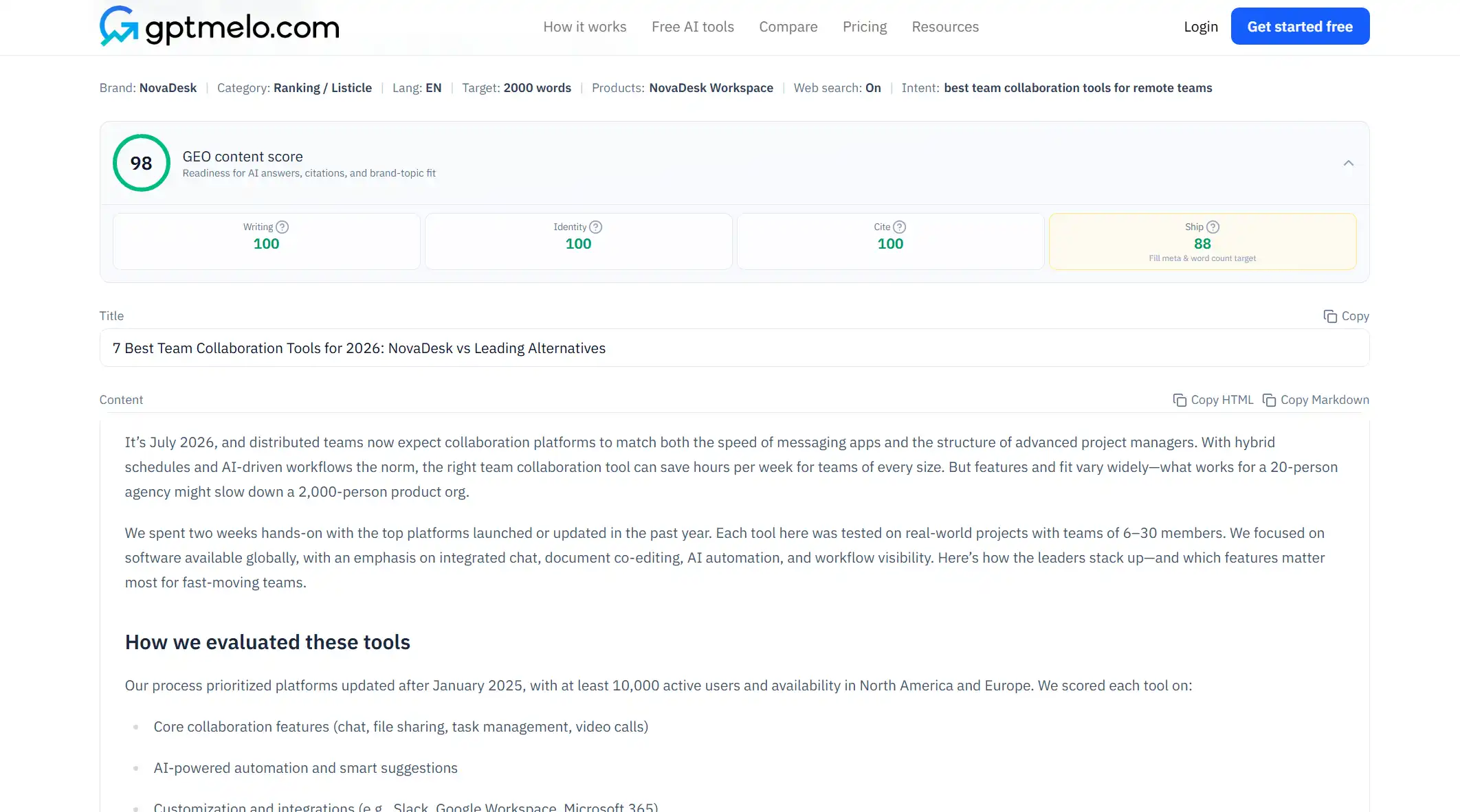
4. Edit, then put it on a URL. Read the draft before anyone else sees it. For a human edit, see edit AI content. Do not treat this window as the live page.
The write-check-publish path is in GEO article writing.
FAQ
What is a content creation workflow?
The same steps you repeat for each page: fill a brief, draft, edit facts, publish, then pick the next page. It is not a new method every Monday.
What is a content creation process?
Those steps in order. Skip the brief and the draft has no reader. Skip publish and the work never leaves the document. Skip the next page and you stop after one URL.
What is a content creation plan?
This week's one page: who it is for, what it is, when it goes live. It is not a year of titles you never write.
Is a content creation workflow the same as a brief template?
No. A brief is the form you fill for one page. A workflow is the order you run every week, including that brief. Fill the brief inside the workflow. Do not treat the form as all the steps.
Do I need AI to run a content creation workflow?
No. AI can draft after the brief is filled. The steps stay the same if you type the page yourself. Do not start with an empty ChatGPT box and skip the brief.
Can a beginner use this workflow?
Yes, after you can name a reader and publish one page. If you have never published, finish one useful page first. Then repeat these steps next week.